Store and enjoy Music With Synology NAS – Audiophile Music
Store and enjoy Music With Synology NAS
Network attached storage (NAS) is a centralized server that allows multiple users to store and share files over a Transmission Control Protocol/Internet Protocol (TCP/IP) network through wifi or an Ethernet cable. NAS provides an affordable and easy-to-maintain network storage option.
Synology Inc. is a Taiwanese corporation that specializes in network-attached storage appliances. Synology has offices all over the world such as USA, UK, Germany, Japan…NAS Synology provides a centralized location on a network to store data. A Synology NAS goes beyond that, enabling you to build a private cloud to store, access, back up, and share files freely and securely.
Synology Nas is used for many purposes, we are only talking about storing and enjoying high quality music with Synology Nas. Once you’ve built your NAS system, install Audio Station to enjoy music anytime, anywhere on multiple network connected devices.
1. Install Audio Station
Login DiskStation Manager (DSM), then Go to Package Center and find Audio Station. Click Install.
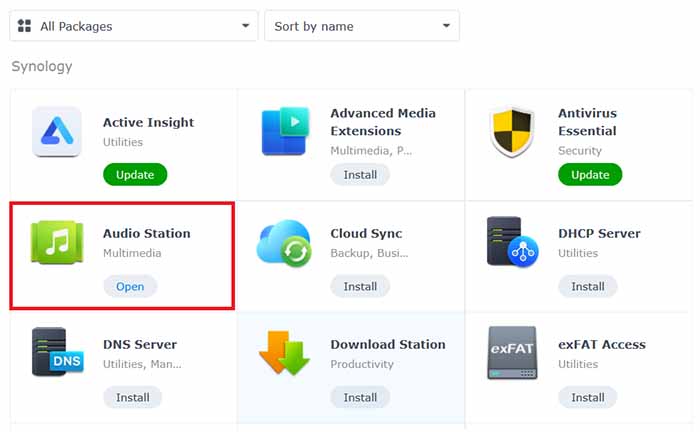
Once the app is installed, a shared folder named Music will be automatically created in File Station. This is the default shared folder for Audio Station, and the app will only accept all the music in this folder.
2. Store Audio Files to music folder
Go to File Station > music and click Upload
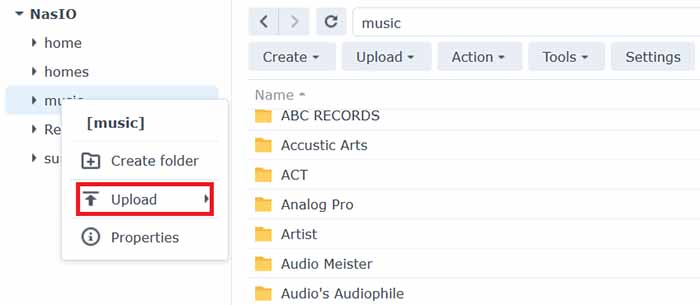
Select the files of folder albums you want to upload to your music folder from your local computer.
3. Play music on computer
Next, you can click on each folder, select each song that you want to play on the device you want to listen to. If your house has several DLNA standard audio systems, connected to the same LAN, it will display that many devices for you to choose to play.
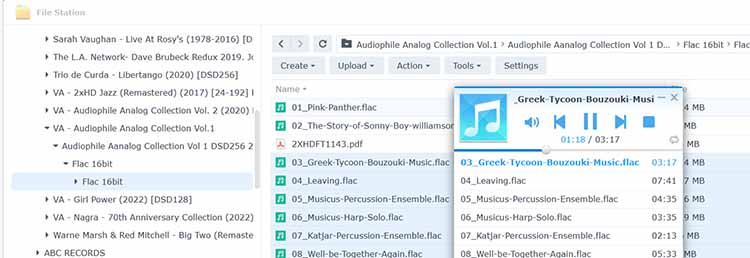
4. Browse Music
If you want to be able to access and browse your music files when you are not in your local network, you are recommended to enable QuickConnect at Control Panel > External Access > QuickConnect. If you do not have a Synology Account, you can set one up within minutes and then give your DiskStation a QuickConnect ID. With this option enabled, you can now log into DSM and access your music from anywhere.
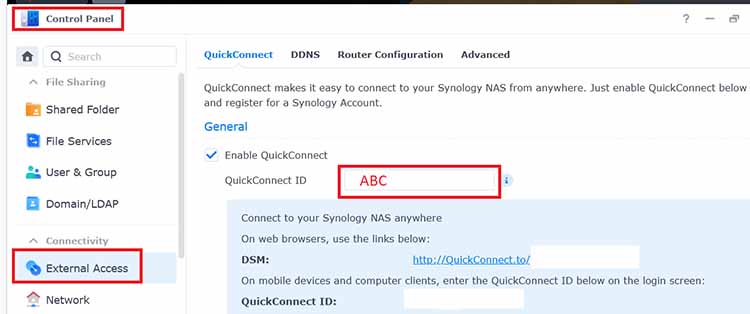
5. Play Music on Mobile Devices
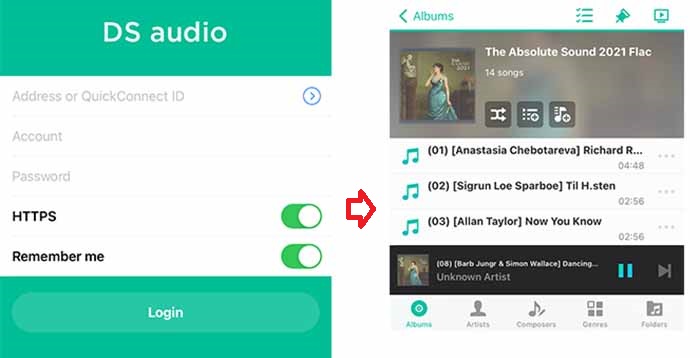
You can use your QuickConnect ID to log into DS audio to .DS audio runs on iPad/iPhone/iPod touch, and Android devices. The app is available for free on Apple App Store and Google Play
Login to DS Audio > Enter IP address or Quickconnect ID of the NAS > The NAS Account > The NAS Pasword
Select songs, genre, artist, or album and enjoy.